
Easy, Quick, Notes, Organized How You Want
Notes That Stay Out of Your Way
Notes shouldn’t ask anything of you before you can use them. Zindash keeps the toolbar down to what actually matters, builds a navigable outline out of your headings automatically, and lets one note live under every tag where it’s relevant — so the effort goes into what you’re writing, not into managing the note itself.
Note Indexes
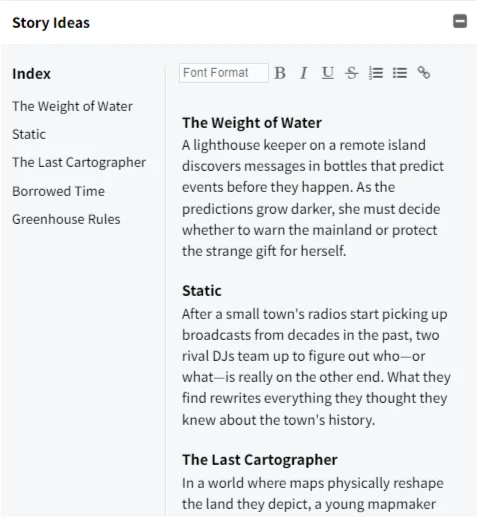
Any note that uses headings automatically builds its own clickable outline alongside it — click an entry and it jumps straight to that section, no scrolling and hunting. It’s a small thing that pays off the moment a note grows past a screenful: turn a long note into something you can navigate instead of scroll through, and it stays current as you type — no extra step to keep it in sync with what you actually wrote.
Formatting Options
No font pickers, color swatches, or size menus to dig through — just headings, bold, italic, lists, and links, the handful of tools that actually matter for organizing a thought. It’s less an editor to configure and more a note that stays out of your way, so writing something down never turns into formatting it.
Same Note, Multiple Locations
Tag a note with more than one tag and it shows up under every one of them — no duplicating or copy-pasting a note across contexts. Keep a note filed under both “personal” and “project X” (or however you split things up) and find it wherever you happen to be looking, all pointing at the exact same content.