
Your Schedule.
On Your Terms.
More Than a Schedule
Zindash’s schedule isn’t just somewhere to see what’s next, it’s built to remember what you actually did with your time. Block out your day by dragging right on the grid, color and tag events as you go, and those tags quietly become the backbone of something more useful than a calendar: a running record of hours by client or project, priced at whatever rate you set, ready to hand off as a report or export the moment you need one. Here’s how it all fits together.
Event Coloring
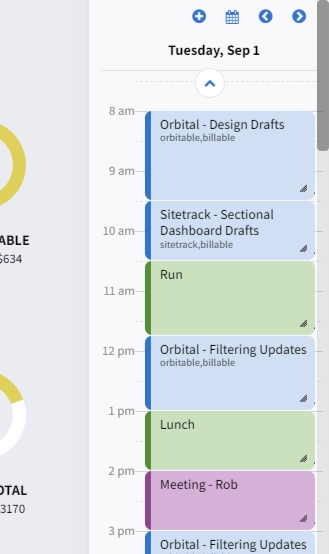
Assign any event a color right from the same popup where you set its time and title, and it’s reflected instantly on the calendar tile. It turns a busy week into something you can read at a glance, whether it’s client work, personal time, or deadlines, all without opening a single event to know what kind of day you’re looking at.
Drag-to-Schedule
Click and drag directly on the calendar grid to create a new event at exactly the length you dragged, and drag an existing event to reschedule it or resize it to change its duration. A calendar you can actually manipulate, not just fill in: block out your day the way you’d sketch it on paper, then fine-tune the details after.
Schedule Item Tagging
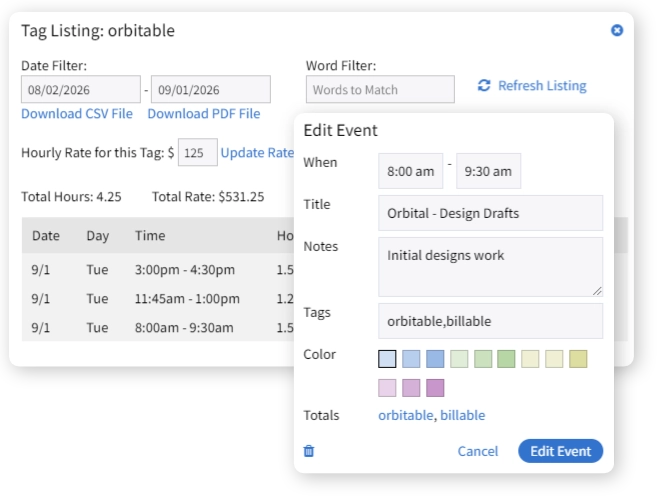
Tag individual events (multiple tags per event, comma-separated) the same way you’d tag a note or list, except here, every tag becomes a clickable link right on the event that pulls up everything filed under it. It’s what turns a schedule full of individual appointments into something you can actually group and total up by client, project, or category.
Billing Rates By Tag
Set an hourly rate for any tag, and every event carrying that tag gets priced automatically when you pull up its totals. Bill different clients or project types at different rates without having to enter a dollar amount by hand on every single event.
Reporting Tools
Pick a tag and a date range and get a full breakdown, every event, its hours, its rate, its line total, plus a running total for the whole period. It’s the difference between remembering you did the work and being able to prove exactly how much of it, and when.
Export of Schedule Data
Take that same report and export it straight to PDF or CSV, one click, no retyping into a spreadsheet or invoice. Whatever happens next; an invoice, a client record, your own books, the numbers are already in a format that gets you there.